

No products
Prices are tax included
-
SOLUTIONS
-
-
BUY
-
-
THIN INSULATION
-
R'BULL pro 13 | Thin Reflective Insulation...
14 Review(s)337,58 € 450,10 € -25%Delivered to your home* price: ◉ Europe...
À prix réduit!Delivered to your door free of charge -
R'BULL pro 13 | Thin Reflective Insulation...
1 Review(s)333,09 € 444,12 € -25%Rate delivered to your home* : ◉ Europe...
À prix réduit!Delivered to your door free of charge -
R'BULL pro 5 | Thin Reflective Insulation...
3 Review(s)421,05 € 561,40 € -25%Rate delivered to your home* : ◉ Standard...
À prix réduit!Delivered to your door free of charge -
R'BULL pro 5s | 5mm floating parquet...
3 Review(s)296,24 € 370,30 € -20%Rate delivered to your home* : ◉ Standard...
À prix réduit!Delivered to your door free of charge -
Aluminium adhesive tape 75 mm x 50 m....
2 Review(s)26,00 €Rate delivered to your home* : ◉ Europe stock...
In stock -
R'Acoustic 20 | Thin Acoustic Thermal...
5 Review(s)234,43 € 275,80 € -15%Rate delivered to your home* : ◉ Standard...
À prix réduit!Delivered to your door free of charge -
R'Acoustic 10 | Thin Acoustic Thermal...
3 Review(s)200,52 € 235,90 € -15%Rate delivered to your home* : ◉ Standard...
À prix réduit!Delivered to your door free of charge -
R'Acoustic Alu | Insolant Mince Réflecteur...
2 Review(s)251,77 € 296,20 € -15%Rate delivered to your home* : ◉ Europe...
À prix réduit!Delivered to your door free of charge -
R'BULL pro 5 | Thin Reflective Insulation...
1 Review(s)202,50 € 270,00 € -25%Rate delivered to your home* : ◉ Standard...
À prix réduit!Delivered to your door free of charge -
R'Flam Pro 6 | Thin Reflective Insulation...
2 Review(s)497,03 € 662,70 € -25%Home delivery price* : 1 Roll : 19.88 €/m²...
À prix réduit!Delivered to your door free of charge -
R'Flam Tape - Non-combustible aluminum...
23,46 €Flame-retardant aluminium adhesive roll for thin...
In stock
-
-
-
-
Heating panels
-
Fire-retardant heating film for radiant...
4 Review(s)70,20 €Rate delivered to your home* : ◉ Europe...
En Stock -
Fire-retardant heating film for radiant...
51,48 €Rate delivered to your home* : ◉ Europe...
En Stock -
eFilm Power - Width 60 cm
1 Review(s)59,84 €Heating film for specific applications 25-year...
In stock -
-
-
Cassette radiant great heights :...
498,30 €The radiant heating CRIR 1800 is intended for the heating...
En Stock
-
-
Thermostats
-
Connected programmable thermostat for...
9 Review(s)113,04 €Rate delivered to your home* : ◉ Stock France...
STOCK FRANCE: In stock for delivery within 24/48 hours with tracking. -
Connected programmable thermostat for...
2 Review(s)120,24 €Rate delivered to your home* : ◉ Stock France...
STOCK FRANCE: In stock for delivery within 24/48 hours with tracking. -
Radio-connected, programmable 4G wifi...
149,76 €Connected radio thermostat . Programmable device...
STOCK FRANCE: In stock for delivery within 24/48 hours with tracking. -
Floor probe for radiant floor heating...
20,00 €Rate delivered to your home* : ◉ Express...
In stock for delivery within 24/48 hours (France stock)
-
-
-
-
Heated mirrors / Connected furniture
-
Mirolia Pro series. Self-adhesive heating...
3 Review(s)110,88 €No more fogging up your mirror! Mirolia eliminates...
STOCK FRANCE: In stock for delivery within 24/48 hours with tracking. -
Custom-made heated mirror
2 Review(s)59,40 € 66,00 € -10%We create the heated mirror of your dreams 2 options...
À prix réduit!In stock -
Mirolia Carbon Pro series. Self-adhesive...
100,84 € 112,04 € -10%Turn your mirror into a heated mirror. Freedom...
À prix réduit!In stock -
MIROLIA PANEL DECO
1 Review(s)1 020,00 € 1 360,00 € -25%Mirolia Panel Deco is a decorative heated mirror with...
À prix réduit!En Stock -
-
Hot Table, musical back-lit
6 312,24 €Table immersive to animate your evenings with your...
In stock -
-
-
Switch
-
Magic Switch, the switch is invisible...
1 Review(s)115,68 €Advantages : Removes the risk of...
Available
-
-
-
-
Payment in 4 instalments, interest free

-
Connectors
-
Lever terminals 2 conductors in line -...
1 Review(s)21,90 €Price delivered to your door* : Set of 50...
In stock for delivery within 3 days (France stock) -
Flexible cable with grounding connector...
10,77 € 11,34 € -5%Earth connection of our aluminum insulators for the...
À prix réduit!In stock for delivery within 3 days (France stock)
-
-
Fasteners
-
Clips + screws for fastening ceilingo...
57,90 €*Metropolitan France and Belgium only.
In stock for delivery within 3 days (France stock) -
Set of 100 5 x 50 mm flat-head screws +...
50,00 €Ideal for creating an air gap and limiting contact points...
In stock for delivery within 3 days (France stock)
-
-
Services
-
Complimentary telephone technical support,...
60,00 €The purchase of our products we undertake, which is why...
Service included
-
-
-
-
Understand
-
-
CONTACT
-





How to pair the wifi and 4G programmable thermostat with your phone
Published:
11/12/2020 15:51:18
Categories:
Thermostats
Remote control does not save money on its own
Turning the setpoint down by one degree from your phone does exactly what turning it down at the wall does. What changes the bill is being able to set schedules that match how the home is actually lived in, and to correct them when that life changes.
What a permanent link makes possible
Radiant heating has low inertia: the sensation arrives quickly. That allows short boost periods, triggered at the right moment rather than early as a precaution. For that the thermostat has to be reachable, hence the wifi or 4G link.
The procedure
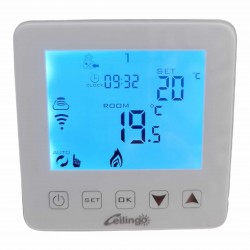
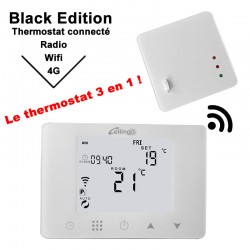
The Smart RM app adds the thermostat to your network. The wifi code is entered by pressing the SET and OK keys together. If the wifi symbol does not appear, switch the unit off and on again and start over. When the indicator stops flashing the link is established and the room can be renamed.
Temperature calibration, which logically comes next, is set out on the page about pairing and calibration. What an installation actually consumes is quantified on the how much does a radiant ceiling consume page.
What the app shows that is genuinely useful
Beyond the setpoint, consumption tracking is the function that changes habits. Seeing in kilowatt hours and in euros what it costs to keep one room two degrees above the others turns a hunch into a decision. It is also what reveals a door left open or a shutter never closed.
If the link drops
A connected thermostat that loses its link carries on heating to the last programme it received. It does not stop and does not fall back to a default mode. That is an elementary precaution, but it is worth checking on any unit before buying.
